 |
FREE !!! |
|
|
|
FREE !!! |
|
*** Click Here to checkout the NEW OFFICIAL website for Monitor Dot! ***
10/24/22 - Story
behind this
app:
For a long time there was a popular app that was free to use by everyone. Then
recently the app suddenly displayed a message stating that a mandatory update
was required.
This update basically changed the app into a trial version that expired within
hours after installing it. To continue using the app, the company now wants a
monthly fee!
So, because they got greedy and
decided to screw over their users by disabling everyone's app without notice, I
decided to return the favor by creating my own app and giving it away for
FREE!*
Their loss, your gain.
...and please enjoy my
retro webpage design :)
Check out TechDoctorUK's review of VPN Monitor Dot:
How will VPN Monitor Dot help protect my Privacy?
VPN's help protect your privacy when you are on the internet. But they can only
do that when they are working properly.
Even if a VPN has it's "Auto-Start" feature enabled,
there is no guarantee that it will properly run 100% of the time when you power
on/bootup your device.
And even when a VPN is running properly, it may
suddenly disconnect or crash even hours later without giving you any warning!
This is why using VPN Monitor Dot
is so important
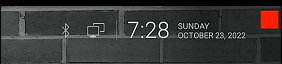
VPN Monitor Dot will continuously monitor your VPN connection and let you know it's working by displaying a status "Dot" in the top right corner of your screen...
When you ARE being protected by your VPN, the app will slowly flash a GREEN dot:
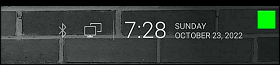
But when you are NOT being protected by your VPN (because the VPN is not turned on or it crashed), then the app will slowly flash a RED dot:
----- VPN Monitor Dot vs. the
"Other Guy's" app -----
1) Why does the "Other Guy's" app need
Read/Write Access Permission to my device's photo/files Storage?
I have no idea why the other app
needs it, but keep in mind
that because their
app also has internet access,
it could theoretically add/delete or
send your files to a remote cloud server without your knowledge or approval!
VPN Monitor Dot does not need this potentially dangerous permission
in order to fully protect you :)
2) VPN Monitor Dot was designed in a highly
efficient way to minimize it's memory/resource footprint.
Just see the
difference for
yourself:
|
The Other Guy's ---- vs. ---- VPN Monitor Dot APK
size: |
Size does matter, and being x100
TIMES
BIGGER is NOT a good thing!
Why is Smaller Better?
Because VPN Monitor Dot uses very little resources when running, it has a much higher chance of
staying loaded in memory whenever
Android decides to start killing processes to free up
resources.
That means VPN Monitor Dot will be able to stick around to help keep you protected.
The last thing you want is for your VPN to crash and never know it because the
monitoring app was killed!
IMPORTANT NOTES:
|
Installation:
|
Need additional help with installation?
Click here
for an easy tutorial from Troypoint.com!
Some distributions of v0.3 require you to run a “loader.exe” or “patch.exe” (again, as administrator) before launching the main tool. This bypasses the dongle check. Follow the instructions in the included Readme.txt file precisely.
Removes or logs out of a Samsung Account without needing the password.
Helps remove pattern, PIN, or password locks without losing data (depending on the device model and Android version).
Read hardware and software specifications even if the phone is locked. System Requirements
The (commonly referred to as UltimateSams ) is a specialized software module designed for repairing, flashing, and bypassing security locks on Samsung smartphones. Key Features and Functionality ultimate multi tool samsung v0.3 free download
The is a specific module of the UMT software suite designed for technicians to perform advanced repairs on Samsung mobile devices. While often marketed as a "free download," it typically requires a physical UMT Dongle or Smart Card to function. Core Features & Functionality
What are you trying to fix (FRP, boot loop, or unlocking)? Share public link
If you need help resolving a specific error or checking compatibility for a device, please share:
Removes Google account locks after a factory reset. Some distributions of v0
Tap View on the phone screen. The device will automatically open Google Chrome or the Samsung Internet Browser, allowing you to proceed with manual layout configuration or settings-injection steps. Safety Guidelines for Mobile Flashing
: Extract the version 0.3 module zip folder to a dedicated directory using WinRAR or 7-Zip.
If not automatically installed, run Samsung_USB_Driver_for_Mobile_Phones.exe from the package. Restart your PC after installation.
: Includes fixes for "Binary Rejected" errors during firmware flashing and updated security protocols for newer Android builds. Removes or logs out of a Samsung Account
Before downloading, ensure your workstation meets the necessary technical specifications to prevent data corruption during operation.
Ultimate Multi Tool Samsung v0.3 Free Download: The Complete Guide
: Includes functions for reading device info, factory resets, and managing security partitions like NVRAM. Critical Considerations for Users